Menu Uninstaller Pro.
Total control over installed software.
If the built-in Windows "Add/Remove Programs" utility isn't your cup of tea, Menu Uninstaller Pro offers an elegant GUI, batch removals, deep registry information, and shortcut-level uninstall commands.
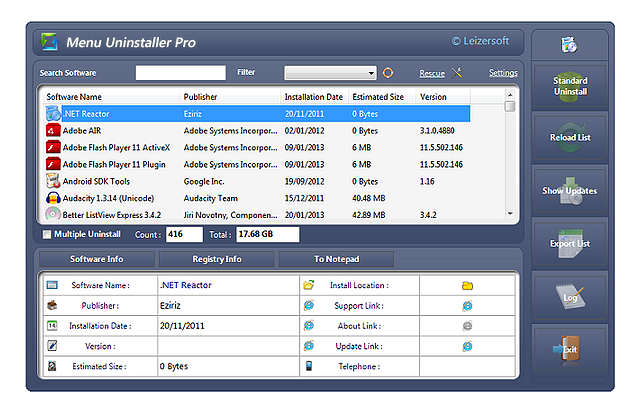
Detailed information about every application
Menu Uninstaller Pro displays comprehensive metadata for every installed software on your machine: publisher, installation timestamp, estimated drive size, version strings, exact installation paths, and registry keys.
- ⚡ Right-Click Shortcut Uninstall: Never search through system control panels again—right-click the desktop icon and remove.
- 📦 Batch Queue: Select 5, 10, or 20 programs and remove them in sequence automatically.
- 🔍 Instant Filter: Type the first few letters in the real-time search box to find any installed utility immediately.
- 🔒 App Lock Protection: Lock the uninstaller with a master password to prevent accidental or unauthorized removals.
Complete Software Registry Inspector
Access deep system details normally hidden in the Windows registry:
- ✓ Open direct installation directory in Windows Explorer
- ✓ Jump to official publisher Support, About, and Update URLs
- ✓ Export software inventory and registry keys to text reports
- ✓ View total disk space footprint across selected batches
Reviewed by Global Tech Editors
"An easy-to-configure application that helps you clear your computer by safely uninstalling any unwanted or outdated program using batch operations."
"If you're looking for a more convenient way to uninstall applications without having to open Add or Remove Programs each time, Menu Uninstaller is the most suitable tool for you."
🛡️ Package Verification & Technical Specs
✓ VirusTotal Clean • No Adwareℹ️ If Windows SmartScreen displays a prompt, click "More info" → "Run anyway". Leizersoft installers are 100% clean, standalone binaries with zero third-party toolbars or bundled telemetry.